

NexusLIMS Database#
Overview#
NexusLIMS uses a SQLite database to track experimental sessions and instrument configuration. The database file location is specified by NX_DB_PATH.
Key features:
Single-file database for easy backup (just copy the file)
Created from SQLModel ORM Definitions
Inspectable with database tools such as DB Browser for SQLite
SQLModel ORM Migration#
Added in version 2.2.0: NexusLIMS now uses SQLModel for database operations instead of raw SQL queries. This provides type safety, automatic datetime handling, and cleaner code.
Notable Changes#
The
db_query()function for manual database queries has been completely removed fromnexusLIMS.db.session_handlerEventTypeandRecordStatusare now enums (EventType,RecordStatus) instead of string literalsSessionLogandInstrumentare now SQLModel classes with real object-relational mappingThe
Instrumentdataclass has been replaced with a SQLModel class - useinstrument_pidfield instead ofname
Migration Examples#
Creating session log entries:
# New approach: has not changed significantly other than using enums
from nexusLIMS.db.models import SessionLog
from nexusLIMS.db.enums import EventType, RecordStatus
from datetime import datetime as dt

log = SessionLog(
    session_identifier="abc",
    instrument="FEI-Titan-TEM",
    timestamp=dt.fromisoformat("2025-01-15T10:00:00"),
    event_type=EventType.START,
    record_status=RecordStatus.TO_BE_BUILT,
    user="alice"
)
log.insert_log()
Querying the database:
# Old approach (deprecated)
_, results = db_query("SELECT * FROM session_log WHERE record_status = ?", ("TO_BE_BUILT",))

# New approach
from sqlmodel import Session, select
from nexusLIMS.db.engine import get_engine
from nexusLIMS.db.models import SessionLog
from nexusLIMS.db.enums import RecordStatus

with Session(get_engine()) as session:
    results = session.exec(
        select(SessionLog).where(SessionLog.record_status == RecordStatus.TO_BE_BUILT)
    ).all()
Benefits of SQLModel:
Type-safe database operations with IDE autocomplete and type checking
Automatic datetime serialization/deserialization
Relationship navigation (e.g.,
session_log.instrument_obj)~50% less boilerplate code
Foundation for Alembic migrations (database schema version control)
Database Migrations with Alembic#
Added in version 2.2.0: NexusLIMS now uses Alembic for database schema version control and migrations.
Alembic provides a way to track and manage changes to the database schema over time, making it safe to upgrade existing installations and ensuring schema consistency across deployments.
For Existing Installations#
If you have an existing NexusLIMS database (created before version 2.2.0), you need to mark it as migrated to the baseline schema:
# Mark existing database as consistent with the baseline pre-2.0 schema
nexuslims db alembic stamp v1_4_3
This tells Alembic that your database already has the baseline schema structure and doesn’t need to be created from scratch.
Added in version 2.5.0: The nexuslims db command provides simple, user-friendly commands for
common database operations. It automatically locates the migrations directory
inside the installed package, making migrations work correctly after pip/uv
installation. Advanced users can access the full Alembic CLI via
nexuslims db alembic [COMMAND]. The uv run alembic command still works
for development from source checkouts.
Common Migration Commands#
# Check current migration status
nexuslims db current

# Check if database has pending migrations
nexuslims db check

# View migration history
nexuslims db history

# Upgrade to latest schema version
nexuslims db upgrade

# Upgrade to specific revision
nexuslims db upgrade v2_5_0a

# Downgrade one migration
nexuslims db downgrade

# Generate a new migration (development only, requires source checkout)
nexuslims db alembic revision --autogenerate -m "Description"
For advanced Alembic operations, use nexuslims db alembic [COMMAND] to access all Alembic sub-commands. From a source checkout, you can also use uv run alembic directly.
Creating New Migrations#
When you modify the database schema (by changing SessionLog or Instrument, etc.), you should create a migration:
Modify the SQLModel classes in
nexusLIMS/db/models.pyor add new enums innexusLIMS/db/enums.pyDetermine the revision ID following the naming convention:
Format:
v[MAJOR]_[MINOR]_[PATCH][letter]_d[escription](e.g.,v2_5_0a_add_external_user_identifiers)Version number: Match the target release version where this schema change will land
Letter suffix: Use sequential letters (
a,b,c, …) for multiple migrations within the same versionDescription: Brief, snake_case description of the change
Generate migration script (requires source checkout):
nexuslims db alembic revision --autogenerate \
    -m "add external user identifiers" \
    --rev-id "v2_5_0a"
The migration will be created at:
nexusLIMS/db/migrations/versions/v2_5_0a_add_external_user_identifiers.py
Note: The filename combines the revision ID with the sanitized message for readability
Review and edit the generated script in
nexusLIMS/db/migrations/versions/:Verify the
upgrade()function creates the expected schema changesVerify the
downgrade()function properly reverses those changesFor CHECK constraints or enums, you should use hardcoded values in the migration (preserves historical accuracy, migration won’t break if enum changes later)
Add docstring explaining the migration’s purpose if needed
Test the migration thoroughly:
# Apply migration
nexuslims db upgrade

# Test downgrade
nexuslims db downgrade

# Re-apply
nexuslims db upgrade head
Add integration tests in
tests/integration/test_migrations.py:Test that upgrade creates expected tables/columns
Test that downgrade removes them
Test offline mode if migration has conditional logic
Create changelog fragment in
docs/changes/:# Format: {issue_number}.{change_type}.md # Change types: feature, bugfix, doc, removal, misc docs/changes/48.feature.md
Commit the migration script and tests to version control
Note
Revision ID Format
NexusLIMS uses version-based revision IDs with letter suffixes:
Format:
vMAJOR_MINOR_PATCHletter(e.g.,v2_5_0a,v2_5_0b,v2_4_0a)Benefits: Clear association with release versions, sequential ordering within a version
Multiple migrations per version: Use sequential letters (
a,b,c, …)Manual specification: Use
--rev-idflag when generating migrations
Migration Configuration#
Alembic configuration is stored in:
pyproject.tomlunder[tool.alembic]- Source code configuration (migration paths, etc.)nexusLIMS/migrations/env.py- Migration environment setup (automatically reads NX_DB_PATH)nexusLIMS/migrations/versions/- Migration scripts directory (shipped in the package)
The database URL is automatically set from the NX_DB_PATH environment variable in env.py, so you don’t need to configure it separately. All Alembic configuration lives in pyproject.toml, eliminating the need for a separate alembic.ini file.
The nexuslims db CLI command automatically locates the migrations directory using importlib.resources, so migrations work correctly whether NexusLIMS is installed via pip, uv, or run from source.
Important Notes#
Always backup your database before running migrations on production data
Test migrations thoroughly in a development environment first
Never edit applied migrations - create a new migration to fix issues
The initial migration (
v1_4_3_initial_schema_baseline.py) creates the basic database structure that serves as a basis for later migrations
Database Structure#
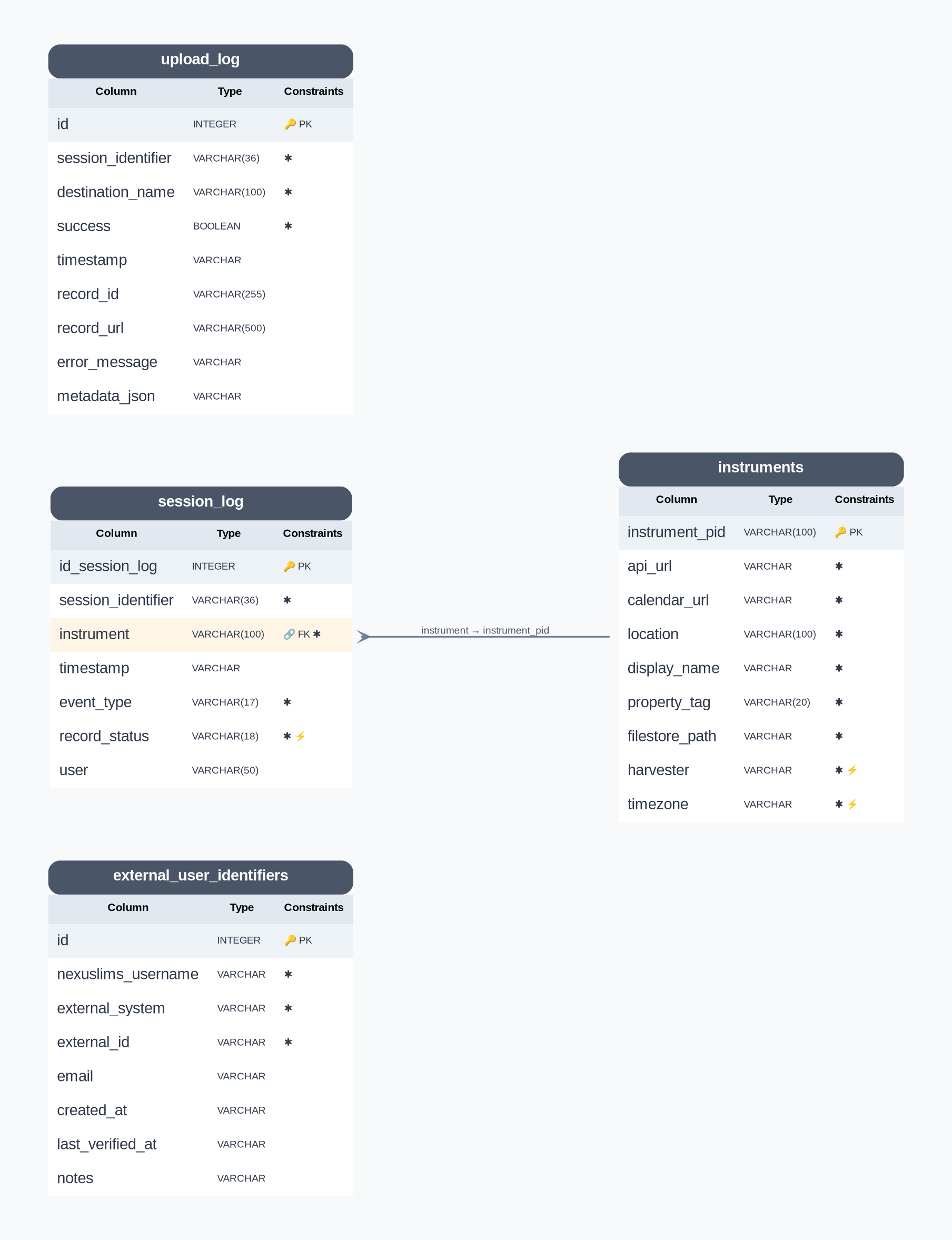
NexusLIMS Database Schema (auto-generated from SQLModel metadata)#
Note
This diagram is automatically regenerated when you build the documentation, ensuring it always reflects the current database schema. Field descriptions are extracted from the SQLModel class docstrings.
For an interactive Mermaid diagram with detailed field descriptions and relationship documentation, see the Database Schema Diagram (also auto-generated).
The database contains four primary tables:
session_log- Tracks experimental sessions and record building statusRecords when users start/end experiments
Tracks record building attempts and completion
Populated by harvesters (e.g.,
nemo)
instruments- Stores authoritative instrument configurationInstrument names and PIDs
Reservation system URLs
Data storage paths
Harvester configuration
upload_log- Tracks record uploads to CDCS and other export destinationsSession identifier and instrument linkage
CDCS record ID and PID
Upload timestamps and success status
Error tracking for failed uploads
external_user_identifiers- Maps NexusLIMS usernames to external system IDsStar-topology design with
nexuslims_usernameas canonical identifierSupports NEMO, LabArchives ELN, LabArchives Scheduler, CDCS
Bidirectional lookup between internal and external identities
Tracks creation and verification timestamps
The session_log Table#
Purpose#
The session_log table tracks experimental sessions from start to finish. Harvesters (like nemo) populate this table by parsing reservation system APIs and creating timestamped event logs.
How It Works#
Session Events - Each row represents a timestamped event:
START- User begins experimentEND- User completes experimentRECORD_GENERATION- Record building attempted
Session Linking - Events are linked by
session_identifierto represent a complete experimental sessionRecord Building Workflow:
Harvester creates
STARTandENDevents with statusTO_BE_BUILTBack-end polls for sessions with
TO_BE_BUILTstatusRecord builder finds files created between start/end timestamps
Status updated to
COMPLETEDorERRORto prevent duplicatesSee record building for details
Table Schema#
The following columns define the session_log table structure:
Column |
Data type |
Description |
|---|---|---|
|
INTEGER |
The auto-incrementing primary key identifier for this table (just a generic number). |
|
VARCHAR(36) |
A unique string (could be a UUID) that is consistent among a single record’s |
|
VARCHAR(100) |
The instrument PID associated with this session (this value is a foreign key reference to the |
|
DATETIME |
The date and time of the logged event in ISO timestamp format. |
|
TEXT |
The type of log for this session. |
|
TEXT |
The status of the record associated with this session. This value will be updated after a record is built for a given session. |
|
VARCHAR(50) |
A username associated with this session (if known) – this value is not currently used by the back-end since it is not reliable across different instruments. |
The instruments Table#
This table serves as the authoritative data source for the NexusLIMS back-end regarding information about the instruments in the Nexus Facility. By locating this information in an external database, changes to instrument configuration (or addition of a new instrument) requires making adjustments to just one location, simplifying maintenance of the system.
Back-end implementation details
When the nexusLIMS module is imported, one of the “setup” tasks
performed is to perform a basic object-relational mapping between rows of
the instruments table from the database into
Instrument objects. These objects are
stored in a dictionary attribute named nexusLIMS.instruments.instrument_db.
This is done by querying the database specified in the environment variable
NX_DB_PATH and creating a dictionary of
Instrument objects that contain information
about all of the instruments specified in the database. These objects are used
widely throughout the code so that the database is only queried once at initial
import, rather than every time information is needed.
Column |
Data type |
Description |
|---|---|---|
|
VARCHAR(100) |
The unique identifier for an instrument in the facility, typically built from the make, model, and type of instrument, plus a unique numeric code (e.g. |
|
TEXT |
The calendar API endpoint url for this instrument’s scheduler. For NEMO, should be of the format |
|
TEXT |
The URL to this instrument’s web-accessible calendar |
|
VARCHAR(100) |
The physical location of this instrument |
|
TEXT |
The human-readable instrument name displayed in NexusLIMS records |
|
VARCHAR(20) |
A unique numeric identifier for this instrument (not used by NexusLIMS, but for reference and potential future use) |
|
TEXT |
The path (relative to central storage location specified in NX_INSTRUMENT_DATA_PATH) where this instrument stores its data (e.g. |
|
TEXT |
The specific submodule within |
|
TEXT |
The timezone in which this instrument is located, in the format of the IANA timezone database (e.g. |
The upload_log Table#
Added in version 2.4.0: The upload_log table was added to track record exports to external repositories.
Purpose#
The upload_log table tracks export attempts to destination repositories like CDCS and LabArchives. It enables multi-destination export with granular success/failure tracking per destination and session.
How It Works#
Per-Destination Tracking - Each export attempt creates a new row, allowing one session to be exported to multiple destinations
Success/Failure Recording - Stores whether export succeeded and captures error messages if it failed
Record Linkage - Stores destination-specific record IDs and URLs for successful exports
Retry Logic - Failed exports can be identified and retried based on
successstatus
Table Schema#
Column |
Data type |
Description |
|---|---|---|
|
INTEGER |
The auto-incrementing primary key identifier for this table. |
|
VARCHAR(36) |
Foreign key reference to |
|
VARCHAR(100) |
Name of the export destination (e.g., |
|
BOOLEAN |
Whether the export succeeded ( |
|
DATETIME |
When the export attempt occurred (timezone-aware). |
|
VARCHAR(255) |
Destination-specific record identifier (e.g., CDCS document ID). |
|
VARCHAR(500) |
Direct URL to view the exported record in the destination system. |
|
TEXT |
Error message if export failed. |
|
TEXT |
JSON-serialized dict with destination-specific metadata. |
The external_user_identifiers Table#
Added in version 2.5.0: The external_user_identifiers table was added to map NexusLIMS usernames to external system IDs.
Purpose#
The external_user_identifiers table maintains mappings between NexusLIMS usernames and user identifiers in external systems (NEMO, LabArchives ELN, LabArchives Scheduler, CDCS). This enables bidirectional user identity lookup and supports integration with external APIs.
How It Works#
Star Topology Design - Uses
nexuslims_username(fromsession_log.user) as the canonical identifier, with mappings to each external systemBidirectional Lookup - Supports both forward lookup (NexusLIMS → external ID) and reverse lookup (external ID → NexusLIMS)
Uniqueness Constraints:
One external ID per system per NexusLIMS user
One NexusLIMS user per external ID per system
Verification Tracking - Records when mappings are created and last verified for auditing
Helper Functions#
The nexusLIMS.db.models module provides convenience functions:
get_external_id()- Get external ID for a NexusLIMS usernameget_nexuslims_username()- Reverse lookup from external IDstore_external_id()- Store or update a mapping (upsert)get_all_external_ids()- Get all external IDs for a username
Table Schema#
Column |
Data type |
Description |
|---|---|---|
|
INTEGER |
The auto-incrementing primary key identifier for this table. |
|
VARCHAR |
Canonical username in NexusLIMS (from |
|
TEXT |
External system identifier. |
|
TEXT |
User ID/username in the external system. |
|
VARCHAR |
User’s email for verification/matching purposes. |
|
DATETIME |
When this mapping was created (timezone-aware, UTC). |
|
DATETIME |
Last time this mapping was verified (timezone-aware, UTC). |
|
TEXT |
Additional notes about this mapping (e.g., |